
The event that activates automation. Once it happens, Apilo instantly takes action whether it’s new order, a completed payment, or a status update.
Automatic tasks
Automate your e-commerce tasks
and save up to 80% of your time!
Define unlimited conditions and let the system automatically execute the actions. Running 24/7, it handles what matter most.
From faster packing to better customer service – make your e-commerce easier with one solution.
What are Automatic Tasks in Apilo?
Automatic Tasks in Apilo are a module designed to automate repetitive activities related to order processing and e-commerce sales management. With every automated action you set up, you significantly speed up order handling, boost your team’s efficiency, and save valuable time.
Tasks that once had to be performed manually can now be reduced to a single click. You decide which actions the system should execute – and you set the rules, tailored to your needs.
Event
Condition
Define precise rules that control when automation applies. Apilo acts only when your exact criteria are met – no more, no less.
Action
The final outcome of your automation. Once all conditions are met, Apilo takes action – automatically completing tasks that used to require manual work.
Full flexibility. Total control. Start fast with ready-to-use automation templates or build your own custom rules and group them however you like. Even at scale, bulk management keeps everything simple, fast, and tailored to your workflow.
Manage faster than ever
Instant activation/deactivation
turn tasks on or off with a single click– directly from the main list
Bulk status changes
select multiple tasks and update their status all at once
Intuitive icons
new, clear action buttons help you work faster and more efficiently

The New Era of Automatic Tasks
Less clicking, more possibilities

Create your own Task Groups
Organize rules by mrketplace, task type, or priority.
Instant Task Relecation
Drag rules across groups in seconds.
Set your own order
Put the groups and tasks you need most at the top.
Work Stress-Free
Deleting a group? Tasks are saved in “Others” so nothing dissappears.
Ready-to-use Templates, just a click away
Select “Popular” to see automations ready to implement.
Detailed Descriptions
Get all the details you need without diving deeper.
Take control of your actions
Easly reorder task actions using a slider.
Perfect Interface
Easly navigate the module to keep your work organized.
Apilo Automation in Practice
Explore the case studies and apply to your e-commerce
Smarter order management
One of our customers struggled with a time-consuming order fulfillment process caused by manual status updates. Each change required multiple clicks, slowing daily operations. The company decided to implement Apilo’s Automatic Tasks with conditional actions.
Once an order was paid or shipped, the system updated the status automatically. This resulted in faster order processing, better organization, and a smoother workflow across the entire fulfillment process.




Unlock the power of Automatic Tasks
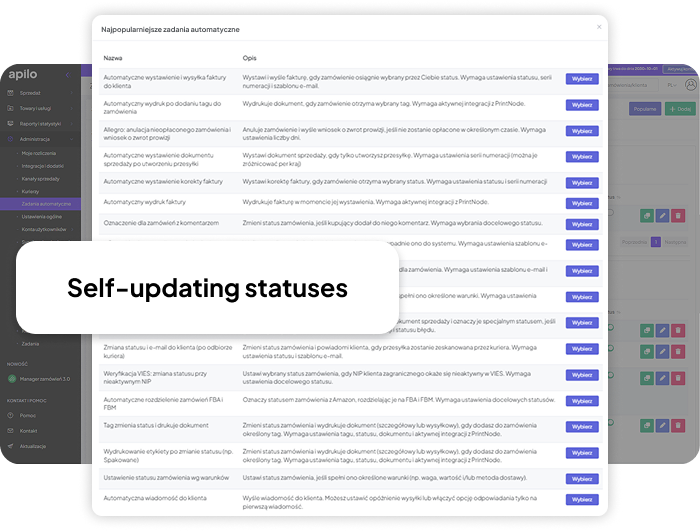
Our most popular automations are available instantly

Instant Invoice Generation
Create invoices automatically when payment status changes.
Smart Order Segmentation
New orders are automatically categorized and displayed in the right section of your Order Panel
Automatic Order Status Updates
Keep order statuses up to date across sales channels and reduce the risk od cancellations.
Automated Email Communication
Define rules so emails are automatically sent according to your templates.
Adding Tags to Orders
Quickly mark orders for invoicing, checks, or customer comments.
Unpaid Order Detection
Automatically identify unpaid orders and trigger refund processes for Allegro commissions.
Print Shipping Label Automatically
Quickly print the last generated label for your orders.
Allegro Message Autoresponder
Automate responses to buyer messages at no extra cost.
Why use Automatic Tasks?
With Apilo, you define your own Automatic Tasks, perfectly tailored to your unique e-commerce workflow. Set various conditions to match specific actions, no limits on the number of conditions or events. Automatic Tasks help you save both time and money, making order management faster, more efficient, and fully aligned with your business needs.
Configure Automatic Tasks in Apilo – simple and fast!
-


Automate your e-commerce operations and save up to 80% of your time
Faster order processing, lower costs, error-free packing, and no more repetitive work.
With automation like this, you can manage your business efficiently across Allegro, eBay, Shoper, Amazon, or any combination of sales channel.
Interesują Cię możliwości systemu Apilo?
Skontaktuj się z nami
Unlock the Potential of the Automatic Tasks Module
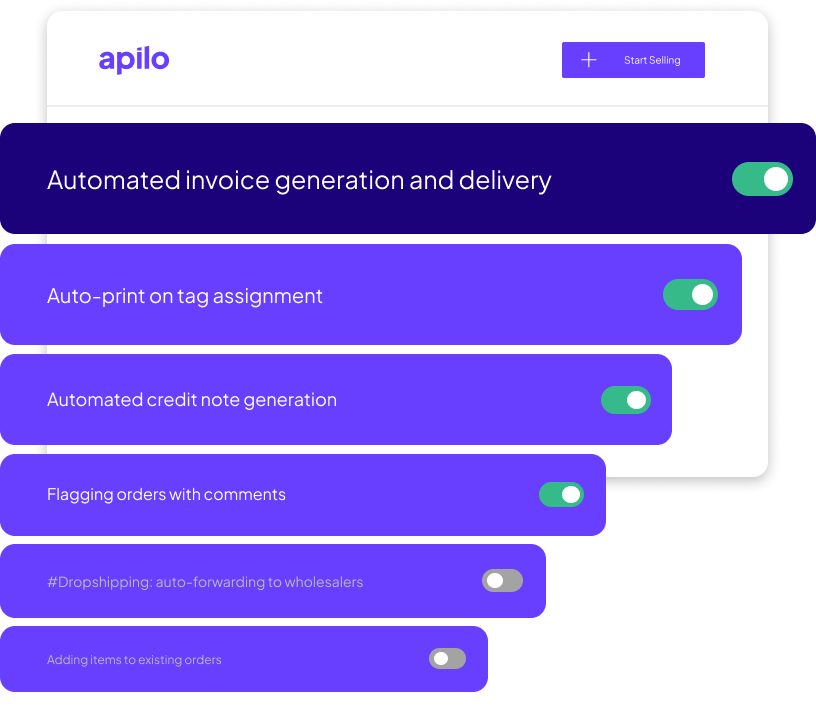
Choose the order status that triggers automatic invoicing and emailing, with your preferred numbering series and template.
Assign a tag to an order to automatically print a selected document via PrintNode integration.
Define the delay for unpaid orders, and let the system handle cancellations and refund requests automatically.
Create invoices or other sales documents as labels are generated, with customizable numbering per country.
Choose an order status to trigger automatic generation of a correction invoice, with your preferred numbering series.
Every new invoice is printed automatically – requires PrintNode.
Assign a specific status to order that include customer comments
Send an email to your supplier instantly after receiving an order, using your chosen templete and address.
Send a notification email to your supplier as soon as a shipping lebel is created, using your chosen template and address.
Define rues so the system adds selected products to order when certain conditions are met.
Ensure every delivered order has a sales document by automatically marking those without one.
When the courier confirms shipment, the system updates the status and send an email to the buyer automatically.
Mark orders from customers with an inactive VAT number in VIES with a specific status.
Automatically recognize the fulfillment method and set the appropriate status for each Amazon order
Add a tag to update the order status and print selected documents instantly – PrintNode integration required.
When the order status changes, the system prints the shipping label via PrintNode.
Create rules that set order statuses automatically based on value, weight, or delivery method.
Configure messages to be sent automatically at a specific time after a status change, with the option to send only the first message.