


Welcome to the Apilo Help Center.
I have Apilo – where should I start?
Contents
Initial company configuration
Click on the notification regarding account configuration after logging into your Apilo.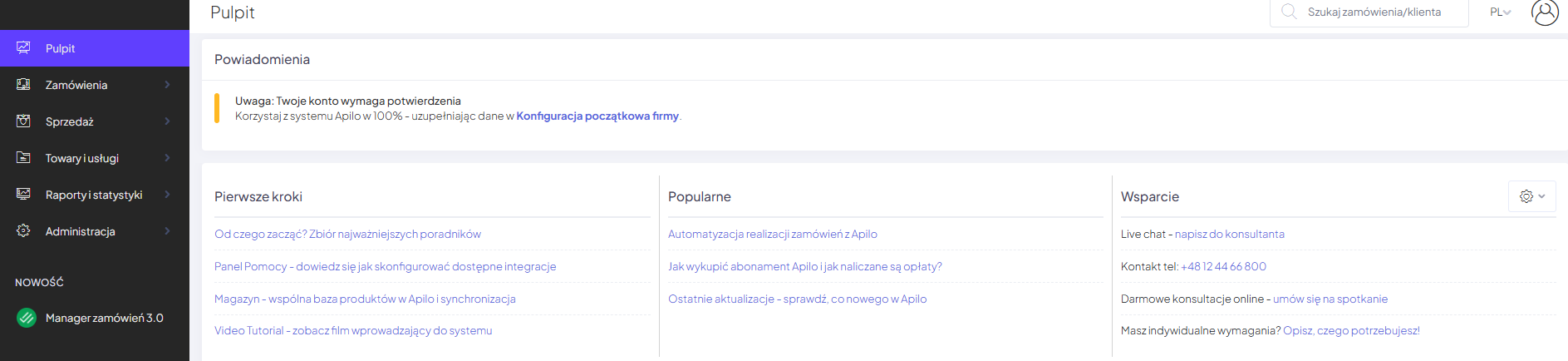
At any time you can change the data using the left panel: Administration -> General Settings -> Company Settings -> Edit
Integration
To utilize the full functionality of Apilo, you need to connect the systems you are using. Add e-commerce platforms, online stores, transportation companies, as well as inventory and accounting programs. Now you can manage everything from the Apilo panel. Go to the Administration -> Integrations and Add-ons tab and configure using the [Add] button.

Product import and creation of a product database
Import products to a shared database and synchronize stock levels across all sales channels. Check the tab: Goods and services -> Products -> Import Products. Familiarize yourself with the guide Product Relationships – how to connect multiple offers from different platforms to one common stock product.
Operation schema
How to manage orders in Apilo?
Check the guide Order Manager 3.0 – work organization
How to manage the product warehouse in Apilo?
This will enable me among other things to synchronize stock levels and prices across sales channels.
- General warehouse operation schema in Apilo.
- Creation of a shared product warehouse for all sales channels.
- Connecting auctions and offers from sales channels to Apilo.
I have an Allegro account(s):
- How to connect Allegro accounts?
- Managing Allegro auctions.
- Allegro configuration – essential for listing auctions through Apilo.
- How to list a product on Allegro through Apilo?
I have a Shoper store(s):
- How to connect Shoper stores?
- Adding products to the Shoper store.
- Downloading stock levels from Shoper and updating on other sales channels.
- Sending orders to Shoper.
I have an eBay account(s):
I have other sales channels:
- Go to integration – how to connect and choose the sales channel that interests you.
I want to generate shipping labels through Apilo:
- Go to integration – how to connect and select the carrier that interests you.
- Configuration of the package shipping module in order to automate the process.
- Bulk shipping of packages.
I want to issue invoices and receipts for orders:
- Invoice module configuration.
- Receipts – connecting the fiscal printer
- Connecting to external integration Fakturownia.pl
- Connecting to iFirma.pl
I want to connect Subiekt GT:
- Sellintegro connector – advanced configuration, requires the Sfera add-on.
- Apilo integration with Subiekt GT – limited configuration, does not require the Sfera add-on.
Want to know more?
Click here and check the set of guides that will introduce you to the world of Apilo!
Can’t manage the configuration?
We can help! Choose a convenient contact channel:
email: bok@apilo.com
live chat (Mon-Fri: 8.00-18.00)
by phone: +48 (12) 44 66 800
This guide has been translated using AI-powered tools.
Still need help?
Talk to a support agent
