Apilo

Welcome to the Apilo Help Center.

Connection with Thunderbird

Connection with Shoper Connection with the Allegro account Connection with Erli.pl Connection to the eBay account Connection to the Amazon account Connection with OLX Connection to Empik Connection with Castorama Connection to Decathlon Connection with Black Red White Connection with Media Expert Connection with Aliexpress Connection with TikTok Shop List of inventory – accounting programs that you can connect to Apilo Connection to Hebe Connection to Morele Marketplace Connection to Ceneo.pl Connection to Kaufland DE / PL / CZ / SK / AT / FR / IT Connection to CDiscount Connection with Shopify Connection to Shopify – Authorization via Custom APP method Connection to Etsy.com Connection with InPost Fresh Connection with InPost Von Halsky Connection with IdoSell Connection with Prestashop Connection to WooCommerce Connection with ShopGold Connection to eMag Connection to RedCart Apilo Returns Connection to Gmail Connection with Labelcall Connection with Thunderbird Connection to Magento Connection with the Inpost courier Ship from Allegro, Allegro Smart, Allegro One Connection with DPD courier Connection with the GLS courier Connection with UPS courier Connection with DHL Poland courier Connection with FedEx Poland Connection with FedEx International Connection with courier Poczta Polska Connection to ShipCenter Connection to Amazon Easy Ship Connection with Orlen Paczka Connection with New Colors Connection with Eurohermes Connection to Paxy Connection with Global24 Connection with the courier Rohlig Suus Apilo Warehouse – based on an external inventory and accounting program of the ERP type Connection with the GEODIS (Pekaes) courier Connection with DPD courier (Germany) Connection with DHL (Germany) Connection with the Apaczka broker Connection with the Furgonetka.pl broker Connection to the Erli.pl broker Connection with the broker Olza Logistic Connection with the Meest Post broker Connection with the BliskaPaczka broker List of all couriers and brokers that you will connect to Apilo. Connection with wFirma.pl – invoices and receipts Connection to FakturaXL – invoices Connection with Fakturownia.pl – invoices and receipts Connection with inFakt Connection with Shoper Invoice and Warehouse Connection with iFirma.pl Connection to Subiekt GT – Sellintegro connector Connection with Subiekt GT/Nexo/Nexo Pro – integratory.pl connector Receipts – connecting a fiscal printer EAN barcodes – Barcode scanner Labels – Connecting the label printer and printing labels directly to the printer (PrintNode)

Configuration on the Apilo side

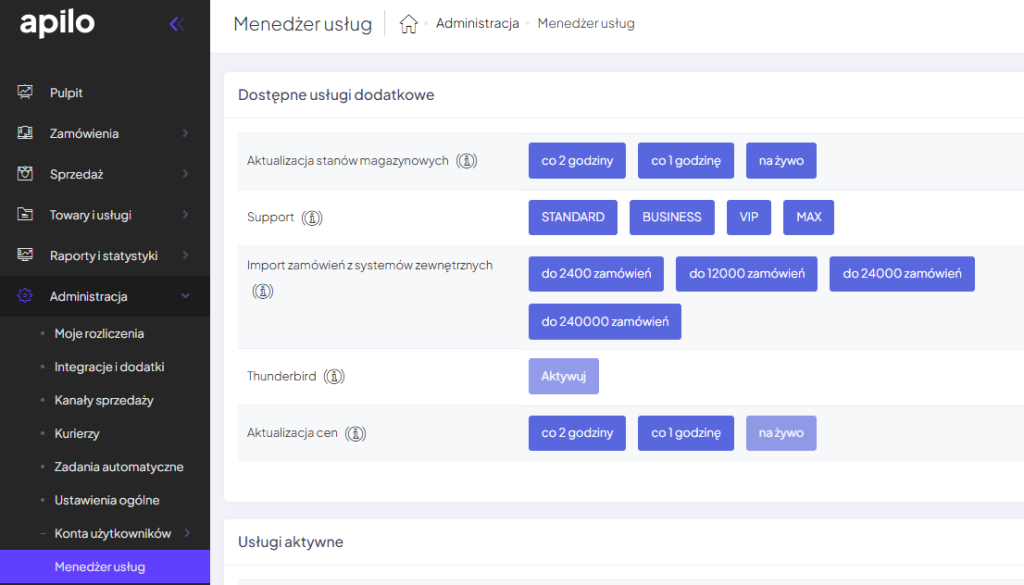
Log in to your Apilo account and go to the Administration tab -> Service Manager. Next to “Thunderbird” click the “Activate” button:
Then go to the Administration tab -> Apilo API Keys -> Add a new API key by clicking on the top right button “New REST API application”:
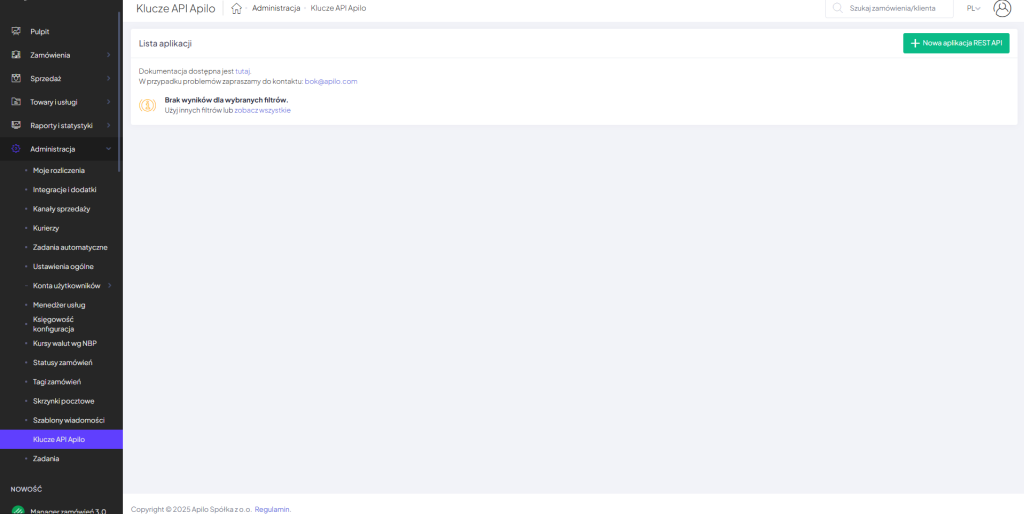
Enter the application name at your discretion, for example, thunderbird.

Configuration in Thunderbird

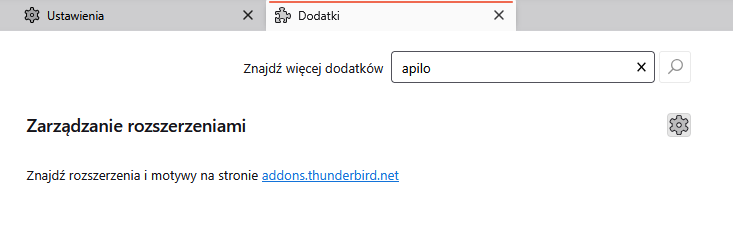
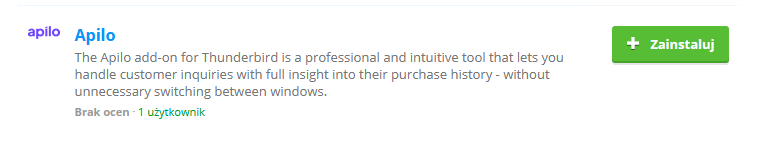
Download the plugin from the page https://addons.thunderbird.net/pl/thunderbird/addon/apilo_add-on/. In your Thunderbird account, click on the gear icon in the bottom left corner -> select add-ons and themes, then search the list for Apilo and click the “Install” button:
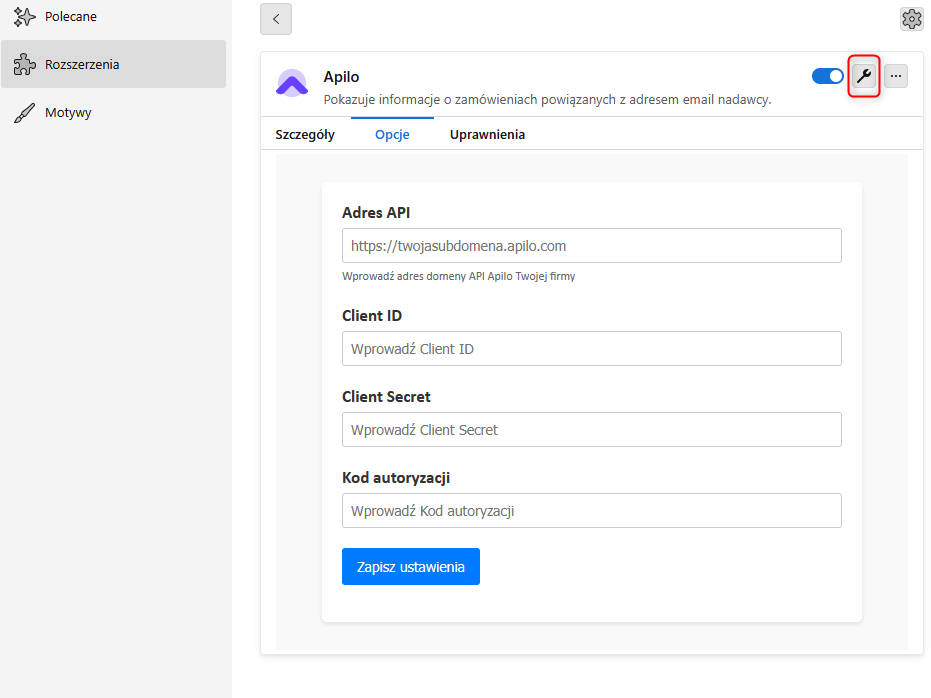
Then go to the “Extensions” tab and click on the option for the addon and fill in the fields by entering the data that was generated in the New REST API application that you added in Apilo:
Thunderbird Operation with Apilo

After receiving a new message, go to the “Inbox” tab and click on the selected email. On the right side, the client’s message will appear along with a dropdown button “APILO”. After clicking the APILO button, the order from the client who contacted you will appear:
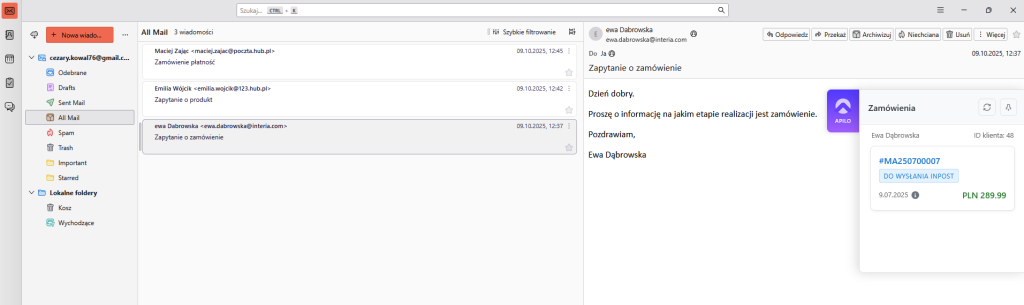
If you want to proceed to the client’s order, just click on the order number, which will be highlighted in blue. After clicking, you will be redirected to your account page with order details. IMPORTANT!To be able to use the additional plugin, your minimum subscription cannot be lower than Basic.


This guide has been translated using AI-powered tools.

Still need help?

Talk to a support agent